
If you are searching for easy home office organization ideas to boost your productivity, keep reading this. Nowadays a lot of people from different professions, are working from home and the companies have seen the profitable it is. The knowledge about work is changing, use it for your benefit.
For anybody, it is a dream to work at home, but no always is stress-free activity. Actually, it takes a lot of time to find out how to start and to keep working without weakening the production levels.
Table of Contents
Where are you going to work at home?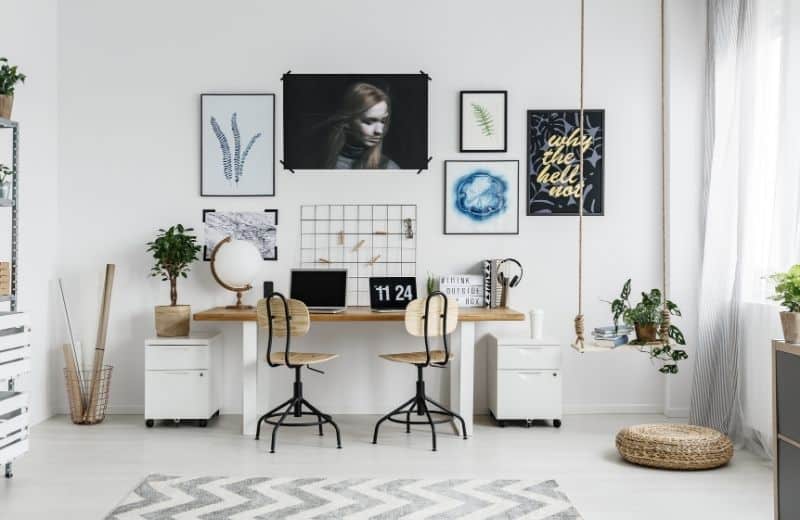
This is the first question you must answer to yourself because the place you choose will influence your efficiency and the development of your work. Your home workplace has to be related to your work needs.
So, the most recommended is to find a room where you can transform it into your new office. But if you don’t have an empty room, you can use the quietest place in the house. A place where your family does not usually stay will be perfect to start.
-
Design a friendly space for your skills
The workplace design is an important issue, it will help you to separate your usual home-space from your new home office space. Also, specialists in design explain that the investment in it can improve your creativity, productivity, and the way you feel about work.
There are so many style recommendations on the net which you can use, but it’s more important that you add all the things that you consider will help you to reach your work goals.
For example, if you are a person that feels comfortable with outside views, you should try to put your desk close to a window. Try to decorate your home office with plants, carpets, pictures, or prove to change the wall’s color. The limit is your imagination.
When you identified with your work home space, spending time there will inspire you.
-
Invest in comfort. Your body will thank you
Don’t be scare! We are not saying you must spend all your money. But being comfortable when you are working is an easy home-office idea to boost your productivity. People used to employ a lot of time trying to get a comfortable position while they are working and that it’s a big mistake.
We recommend you invest in ergonomics furniture, it will increase your productivity and also it will make your worktime more pleasant and comfortable. Actually, researchers said that a poor sitting posture or having bad habits postures during work can injure your muscular-skeletal system and your development.
Start having all your implements, make a list of your work needs. You should include the furniture, connectivity (internet), organizers, and even the light in the room. Those are the basics things that you can control before working. If you don’t do it, they will be future distractors to you.
Related: 10 Houseplants That Purify the Air
Prepare yourself for work at home
Something decisive in all these transitions of working at home is your attitude about it. We know that this is an extraordinary step for you, but don’t be too excited about your new independence. If you don’t have careful and self-control, it will exploit you.
There are some easy home-office organization ideas that you can consider for keeping the inspiration and productivity on top.
-
Establish your schedule and your work hours
We know that you think it is not necessary, and almost all people only consider the flexibility of working from home, but that is a mistake. In fact, home-office requires you to be more responsible and disciplined with your work (especially your work time).
A good home office idea is to make your weekly or monthly schedule. It will make you more organized with your time, making more clearly your work projects and goals to you. Also, it let you identify which the benefits, click here.
You can work all day long if you want to, but you will become an unproductive and tired person. So a method to balance your work-life and home-life is to settle your regular work hours and fit them on your home activities schedule. Doing this not only increases your productivity time also it will make you get your work mood.
The key is to respect the bounds line of both parts of your life. Try to work 8 hours per day, but if you need more time at the office, you should think about it like an extra-time and reward you as a company would do. For those who are hard to manage their time, here is a guide you can try to find out how to start.
-
Dress for success
Maybe you’re thinking that your clothes are not a big deal because you are working at home and it seems unnecessary to look good. Wearing a pajama seems like a good idea at first. But if you have an emergency video call from your client or boss, it is inappropriate to answer, looking like you just woke up from the bed.
You should try to get ready for work, we suggest you create a morning routine. In your working days, you should take a shower and dress comfortably for being at home (you don’t need code drees). This home office organization idea will help you to focus on your tasks and prepare for what comes next.
Actually, dressing for work will have a positive influence on you. You will feel good about yourself, and it will change your attitude about your next activities. You should check the experiences of these 6 fashion bloggers, they will show you that you can work at home looking chic.
-
Set alarms for everything
When people are working, they usually overlook break time and let us tell you that your body NEEDS it. Regular breaks have so many benefits on your health and your work performance.
Some researchers explain, when you have regular breaks where you can nap or do something no related to work will let your brain recover. It will help you to relieve your eyes strain and rest other parts of your body like legs or arms. That will make you more productive and creative in your working time.
People who take their breaks are more focused on what they are doing and less distracted. If you do this, it will make you more able to retain the information and proceed to finish your tasks efficiently.
If for you, it’s hard to remember when your break starts, your phone alarm will be your new BFF! Set your bell for 5 minutes break every hour or 30 minutes break every 4 hours of work.
You should try active breaks too. Walking around for 20 minutes is an easy home-office idea because it will increase your blood flow to the brain, which intensifies your creative part. Or invest in equipment that helps you to exercise, move your muscles, your body and mind will thank you.
Related: 10 Simple Ideas That Will Make Your Home Cozy
How to stimulate yourself to keep working at home?
A home office has a lot of benefits, but sometimes it’s challenging to keep your mind in one thing at the time. While you are at home, the responsibilities and distractions (like laundry, cooking, pets, kids, and other more) appear in your thoughts. And making it hard for you to focus on what you are doing.
Keeping your stimulated about your work is the secret to control your production levels. So we recommend you to heed the following aspects.
1. Avoid distractions
Being at home while you are working makes everything a possible distractor, temptations are just around the corner. So, you must have the strength to put your work first in those moments and keep your mind clean for focus on what matters.
2. Family, Friends, and even pets
Sometimes the people that you love more are terrible distractions. A good home-office idea to avoid distractions is to talk to your family and friends. We know that they need your attention, but that can affect the development of your daily work.
If you live with your family, you must remind them (in a gentle way) that you need SPACE and TIME to work. Set some limits whit them while you are working. Tell them about your works hours and schedule; if they love and care about you, they will understand. Also, if you need any extra help at home, you can count on them.
3. Say bye-bye to social media.
Social media have plenty of uses nowadays, but they can be very distractive tools. So for increasing your productivity and your concentration, we suggest you follow the next tips:
- Turn off the phone’s notification on your work hours.
- Try to separate your personal email from your work email, just check your work email.
- If your phone is unnecessary for work, you can put it away or turn it off.
- You can schedule the time to check your social media.
These ideas can help you to avoid getting distracted by Facebook, Twitter, and Instagram.
4. A clean workspace is a clear mind.
Being organized is not only related to your time, but it also refers to your workspace. A lot of people used to collect unnecessary stuff around their office. It is a bad habit that can be very distractive because you will spend time trying to figure out their places. The mess is not a friend of productivity.
A good home office organization idea is to optimize your workspace. Try to have on your desk only the necessary equipment for work or invest in an organizer. Someplace where you can save your folders, files, and other things that can’t be out of your office.
Also, schedule your office’s clean time, it can be once or twice a week. There you can sort of what is useful and what no. Placing away the empty folders, useless papers, cups of coffee, and anything else that doesn’t belong anymore to your workspace. A clean space guarantees you to have more time for new ideas.
5. The to-do list, go for your tasks
Another thing that you can do for organizing everything at work is making a to-do list. It is a great way to get everything under control. Including your deadlines, your tasks, and getting more things done at the end of the day.
The to-do list will help you to figure out which are your priorities per day. You can make your list the night before and reviewing at the beginning of your workday. With this, you can remind your tasks at work.
It let you know more about your development as a professional, how productive you are, and make you ready to begin your activities. If you are looking for the best app for that, check this article related.
6. Use a rewards system
After a hard workday, you must recognize your wins. You are doing your best all the time, and it is a guaranteed way to keep you motivated about your achievements. A study has shown that remote employees work 1.4 more than a regular person who goes to the office, and they struggle more to balance both parts of their life.
So, we recommend you reward yourself as a way to incentive your productivity. You can go for lunch, or to the cinema, buy something that you really want. Additionally, a few times a month or a year, you can give you a small gift or take a little vacation, you deserve it.
The reward system has a psychological impact on you, researchers explain that self-reward is not a selfish attitude. Actually, it helps you to feel more positive about your projects and makes you settle good habits. Don’t doubt to reward yourself anytime, it will increase your efficiency at work.
7. Not everything is work
Work from home can make you being lonely than other people, it is because you are spending more time at home. Give you a break from your house, a change of space!
When loneliness appears, we recommend you to go out of your house. Take a walk and talk with your neighbor or go for a date, hang out with your friends, or take your children and spend time together.
When you are busy at home all the time, it is easy for you to forget that there are other things to do. You should include outside activities on your schedule, it will be stimulating for your creativity.
Working at home will make you save money and increase your banking account, but if you are not careful, you will end overworking, and that’s not healthy at all. The most important recommendation is to find a balance between your work and life. And these easy home office organization ideas will help you to reach all your goals.